On this page
- Door alarm: any door or drawer open more than three minutes; closing it stops the alarm. 12
- High temperature on a 5 Series: the alarm sounds after two hours of a too-warm compartment. 1
- Power loss on a 5 Series flashes POWER with no sound; ALARM OFF clears it. 1
- oPn or Shr is the temperature sensor alarm; a technician is needed if it persists. 1
- Sabbath mode silences the alarms, and a 7 Series showroom mode hides error codes. 12
What is my Viking refrigerator telling me when it sounds?#
It is reporting one of a short list of conditions that the Viking manuals name: a door or drawer left open, a temperature that stayed too high, a power interruption, or a sensor problem. Which light or number shows decides which one. 12
The 5 Series built-in manual and the 7 Series integrated manual describe the alarms differently, so first note which one you own. A 5 Series has labeled lights such as DOOR OPEN, HIGH TEMP and POWER on a control panel behind the door. A 7 Series uses an alarm button and a numeric display. 12
| What you notice | Series | Manual's meaning | First move |
|---|---|---|---|
| Beeping, DOOR OPEN blinking | 5 Series | A door open for more than three minutes 1 | Close the door; ALARM OFF |
| Beeping, ALARM button blinking, a number in REF or FRZ | 7 Series | A door or drawer open over three minutes 2 | Close it; press ALARM |
| Sound, HIGH TEMP lit | 5 Series | Compartment too warm for two hours 1 | ALARM OFF; check the door |
| Display flashing, sound muted | 7 Series | High temperature alarm 2 | Wait for the normal range |
| POWER flashing, no sound | 5 Series | A power loss 1 | ALARM OFF to clear |
| Sound, display reads oPn or Shr | 5 Series | Temperature sensor alarm 1 | ALARM OFF; book if it stays |
How does the door alarm work?#
The door alarm sounds after three minutes. On a 5 Series the DOOR OPEN light blinks; on a 7 Series the ALARM button light blinks and a number lights in the REF or FRZ display. Closing the open door ends it, or you can press the alarm pad. 12
Look for the usual culprits before you suspect the unit: a bottle on the door shelf that keeps the door from seating, or a drawer not pushed all the way in. If the door closes but the alarm returns, see our care schedule for built-in refrigerators for how the gaskets are kept in shape.
What does HIGH TEMP mean, and how long until it shows?#
On a 5 Series, the alarm sounds and HIGH TEMP glows when either compartment has stayed too warm for two hours. A blinking light shows which part is affected, and the sound ends once the temperature is back to a proper setting. 1
Press ALARM OFF to silence it. On a 7 Series, the alarm sounds and the display flashes when the temperature exceeds the high temperature allowed; pressing the alarm button mutes the sound, but the display keeps flashing until the normal maximum is reached again. 2
Warm food, a long door opening or a fresh plug-in all push the reading up. The manual's troubleshooting table lists a display that does not match the set point after the unit was just plugged in, hot food was added or the door stayed open for an extended spell, and says to allow 24 hours to stabilize. 1 Our HIGH TEMP entry lists what each series prints.
What does a power-loss message look like?#
On a 5 Series, no alarm sounds. The POWER indicator flashes, and ALARM OFF clears it. On a 7 Series, after a long power loss the display shows a power loss, and pressing any key clears the indicator. 12
Both messages tell you the unit lost power for a while, so check what was in the cabinet. Before you trust food, read the manual's power-interruption guidance, which is about freezers: if power will be off a day or less, leave the freezer door shut; for a longer outage, shift frozen food to a locker or use dry ice, wearing gloves. 1
If the unit does not run at all, the troubleshooting table asks three questions: is the cord in a live circuit with the correct voltage, has a fuse blown or a breaker tripped, and is the power switch in the on position? 1
Where is the power switch?#
On a 5 Series, it is behind the top grille: remove the center grille blade and press the switch. On a 7 Series, it sits to the left of center behind the header panel, which is pried off with a small flat screwdriver at the hinge side. 12
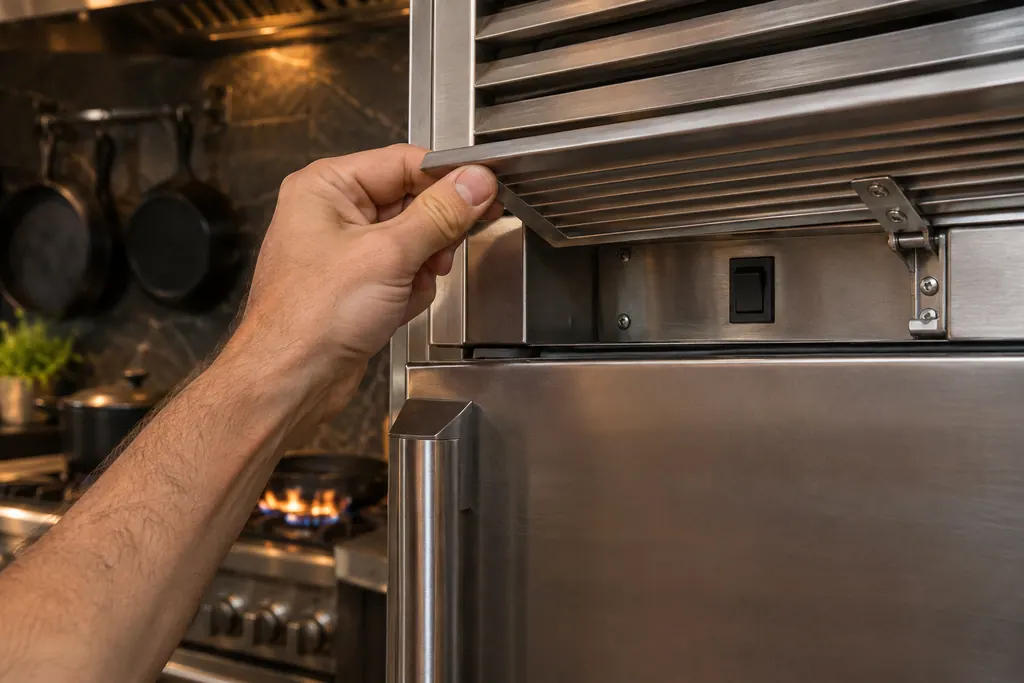
Both manuals stress that the switch must be on after cleaning, servicing or changing bulbs. 12 The 7 Series header panel has wires on its back for the light and a Wi-Fi board, so pull it away slowly. 2
What do oPn and Shr mean?#
They are the temperature sensor alarm on a 5 Series. The manual says the unit sounds and the display shows oPn or Shr; ALARM OFF silences it, and if the display does not return to the temperature, it needs a technician's attention. 1
The manual does not say what a sensor reading means for the food, only that the control senses a sensor problem electronically. Our Shr page holds the full entry. That is a case where the owner cannot fix the cause and a visit is the right next step.
Why is nothing sounding when the cabinet is warm?#
Sabbath mode disables interior lights and alarms. On a 5 Series it is switched on by holding two pads for three seconds and the SAB light shows. On a 7 Series, the SAB button lights blue. If the power fails during Sabbath mode, the unit returns to it when power returns. 12
The 7 Series showroom mode is the other quiet case. When it is on, all controls including temperature regulation stop except the interior lights, and no error codes display. A showroom icon lights blue; holding the VAC and ALARM keys together for three seconds toggles it. 2 A 5 Series has a SHOW light for the same mode. 1 If your cabinet is warm and the panel is silent, look for these indicators before anything else.
How long does a new setting take?#
Plan on 24 hours. A 5 Series arrives set to 38°F on the fresh-food side and 0°F on the freezer side; a 7 Series, to 39°F and 0°F. The manuals say to wait 24 hours after plug-in, and after any change, before judging the cabinet. 12
Fast Cool on a 5 Series runs the compressor at high speed for two hours, and Max Refrigerator mode holds the coldest setting for four hours before returning to the earlier setting. 1 Neither is an alarm; both return to the earlier setting by themselves.
What do I jot down about the alarm before I book?#
Note the model and series, which alarm showed, the time the door stood open, whether Sabbath or showroom mode was on, what the display read, and whether the problem returns after the door is shut.
- Which light or number was on?
- Did the alarm clear with ALARM OFF?
- Was the power switch on, and did power fail recently?
- Has the cabinet had 24 hours since the last change?
Our refrigerator service page names the models covered, and the temperature problems page for the longer checklist.
Sources#
- Use & Care MANUAL / 5 SERIES / Built-in All Refrigerators and All FreezersViking Range, LLC (official manual PDF) · form F21338G EN (022818) · PDF p.8 (settings, power switch, 24 hours), p.9 (door open, high temperature, power loss, sensor alarm, Sabbath), p.16 (power interruptions), p.17 (troubleshooting)
- Use & Care MANUAL / 7 SERIES / Integrated All Refrigerator / Integrated All FreezerViking Range, LLC (official manual PDF) · form 062222-000 (052518) · PDF p.6 (power switch, Sabbath), p.7 (door alarm, showroom mode), p.17 (alarm table)